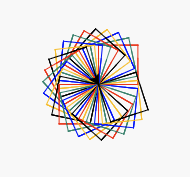
# Lesson 6: Square Spirograph
# Tools
https://trinket.io/ (opens new window)
# Lesson Learns
# Object attributes
- Turtle object has many attributes which we can define how our turtle should be or act.
# shape (opens new window)
- arrow, turtle, circle, square, triangle, classic
main.py
from turtle import *

my_turtle = Turtle()
my_turtle.shape("arrow") # try arrow, turtle, circle, square, triangle, classic
1
2
3
4
2
3
4
# speed (opens new window)
- an integer in the range 0-10 or a speedstring
main.py
from turtle import *

my_turtle = Turtle()

my_turtle.speed(1) # try 0 - 10
my_turtle.forward(50)
1
2
3
4
5
6
2
3
4
5
6
# color (opens new window)
- a string or HEX color code
main.py
from turtle import *

my_turtle = Turtle()

my_turtle.color("#148F77")
my_turtle.forward(50)
my_turtle.color("red")
my_turtle.forward(50)
1
2
3
4
5
6
7
8
2
3
4
5
6
7
8
output

# pensize (opens new window)
- a positive number
main.py
from turtle import *

my_turtle = Turtle()

my_turtle.pensize(1)
my_turtle.forward(50)
my_turtle.pensize(5)
my_turtle.forward(50)
1
2
3
4
5
6
7
8
2
3
4
5
6
7
8
output

# Code a Square Spirograph
# Step 1: create a square
main.py
from turtle import *

my_turtle = Turtle()

def rect():
    for i in range(4):
        my_turtle.forward(50)
        my_turtle.left(90)

rect()
1
2
3
4
5
6
7
8
9
10
2
3
4
5
6
7
8
9
10
output

# Step 2: More!
main.py
from turtle import *

my_turtle = Turtle()

def rect():
    for i in range(4):
        my_turtle.forward(50)
        my_turtle.left(90)

rect()
my_turtle.left(12)
rect()
1
2
3
4
5
6
7
8
9
10
11
12
2
3
4
5
6
7
8
9
10
11
12
output

# Step 3: More and More and More! with loop
main.py
from turtle import *

my_turtle = Turtle()

def rect():
    for i in range(4):
        my_turtle.forward(50)
        my_turtle.left(90)

for i in range(10):
    rect()
    my_turtle.left(12)
1
2
3
4
5
6
7
8
9
10
11
12
2
3
4
5
6
7
8
9
10
11
12
output

# Step 4: Set speed and pensize
main.py
from turtle import *

my_turtle = Turtle()
my_turtle.speed(10)
my_turtle.pensize(1)


def rect():
    for i in range(4):
        my_turtle.forward(50)
        my_turtle.left(90)

for i in range(10):
    rect()
    my_turtle.left(12)
1
2
3
4
5
6
7
8
9
10
11
12
13
14
15
2
3
4
5
6
7
8
9
10
11
12
13
14
15
output
# Step 5: Coloring
main.py
from turtle import *

my_turtle = Turtle()
my_turtle.speed(10)
my_turtle.pensize(1)


def rect():
    for i in range(4):
        my_turtle.forward(50)
        my_turtle.left(90)

for each_color in ["red","#148F77","blue","#FFC300","black"]:
    my_turtle.color(each_color)
    rect()
    my_turtle.left(12)
1
2
3
4
5
6
7
8
9
10
11
12
13
14
15
16
2
3
4
5
6
7
8
9
10
11
12
13
14
15
16
output

# Step 6: Repeat this Spirograph again and again
main.py
from turtle import *

my_turtle = Turtle()
my_turtle.speed(10)
my_turtle.pensize(1)


def rect():
    for i in range(4):
        my_turtle.forward(50)
        my_turtle.left(90)

for i in range(5):
    for each_color in ["red","#148F77","blue","#FFC300","black"]:
        my_turtle.color(each_color)
        rect()
        my_turtle.left(12)
1
2
3
4
5
6
7
8
9
10
11
12
13
14
15
16
17
2
3
4
5
6
7
8
9
10
11
12
13
14
15
16
17
output